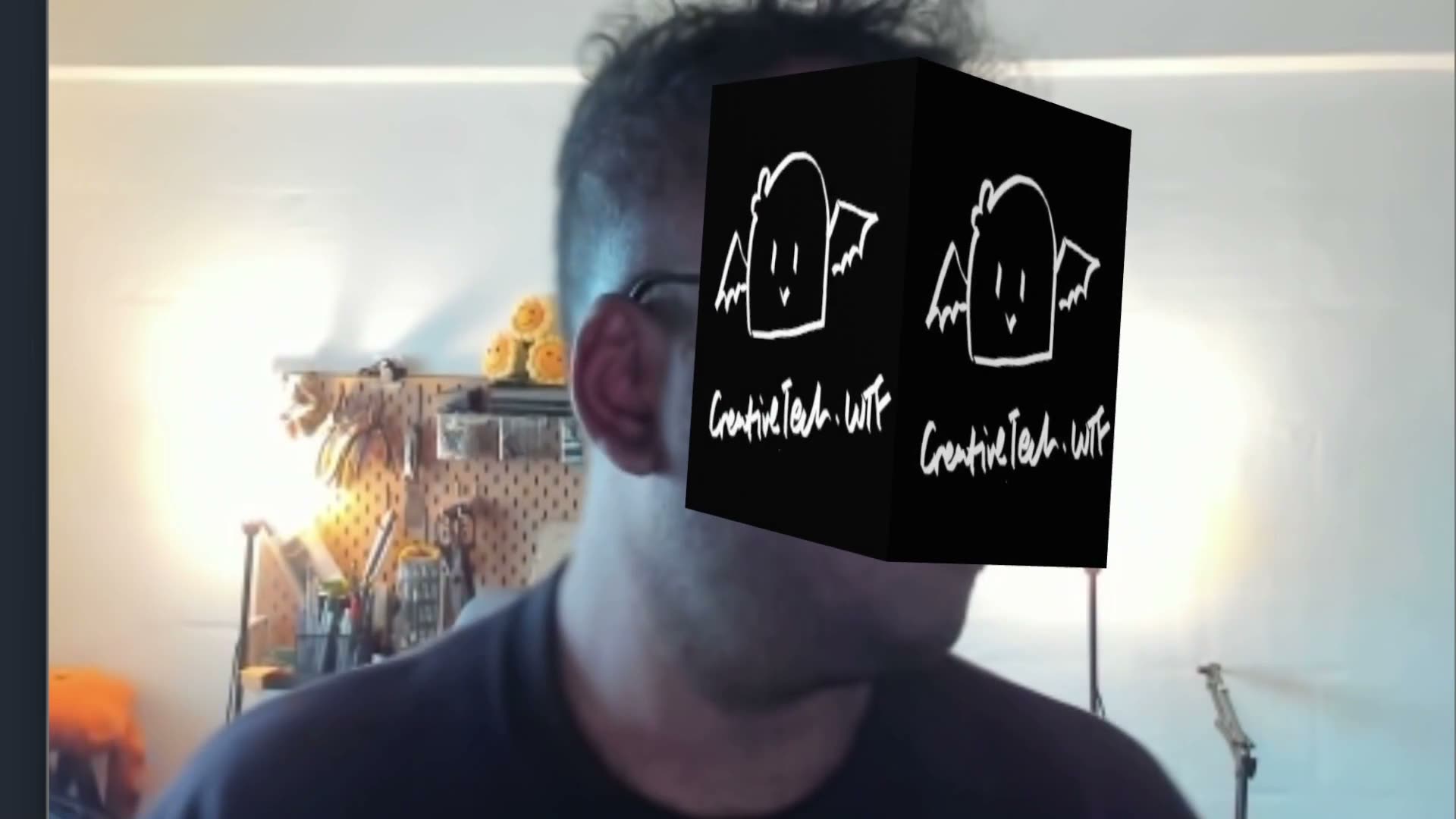
experimenting with MindAR
The Good, The Bad, and The Buggy 🎮
So, Web AR. Sounds like the future, right? I thought so too. Armed with a shaky understanding of augmented reality, a bunch of tabs open on Stack Overflow, and not nearly enough patience, I decided to dive in. This is a rough-and-tumble account of trying to get AR to work in the browser, or at least, to work somehow.
Spoiler: this isn’t a success story so much as a “here’s what I managed to learn before everything imploded” kind of deal.
The Journey
My first stop was AR.js. Not because I knew it was the best, but because it was the first thing I stumbled on. I mean, it looked fine! I figured I’d have something working in no time. Spoiler: no time turned into a lot of time.
AR.js
// Looked promising, didn't deliver
import ARjs from 'ar.js';

const arToolkitSource = new ARjs.Source({
  sourceType: 'webcam'
});

const arToolkitContext = new ARjs.Context({
  cameraParametersUrl: 'camera_para.dat',
  detectionMode: 'mono'
});
I thought this setup would be smooth. It wasn’t. AR.js might work for simpler or older setups, but with SvelteKit? Not so much. I had more troubleshooting tabs open than working AR, so the pivot was inevitable.
The Pivot: MindAR
I turned to MindAR, which offered a more streamlined approach for pattern and face tracking. And this one? It actually worked—with way less drama.
// Clean, less fiddly
await import('mind-ar/dist/mindar-image-aframe.prod.js');

// Pattern Tracking
<a-scene mindar-image="imageTargetSrc: /targets.mind">
  <a-box position="0 0.5 0" />
</a-scene>

// Face Tracking
<a-scene mindar-face>
  <a-assets>
    <img id="cube-texture" src="/texture.png" crossorigin="anonymous" />
  </a-assets>
  <a-entity mindar-face-target="anchorIndex: 168">
    <a-box src="#cube-texture" />
  </a-entity>
</a-scene>
The setup actually rendered a 3D object on my screen. With MindAR, I could use both pattern and face tracking reliably. And that alone was a victory.
Technical Setup (The Essentials)
I’ll be honest: I’m not 100% sure why some of this worked, but it did, so here’s what I did to get Web AR running in my browser (sort of).
1. Getting Started
Basic setup—SvelteKit project, essential dependencies, and fingers crossed.
# Set up a fresh SvelteKit project
npx create-svelte@latest your-ar-project
cd your-ar-project

# AR essentials
npm install mind-ar aframe three @types/three
2. Network Magic for Mobile Testing
To test AR on mobile, I first tried SSL certificates with OpenSSL to enable HTTPS. However, this method left me feeling like a monkey with a screwdriver—lots of effort, not a lot of results. Even when HTTPS showed up, it had a strikethrough, and mobile browsers weren’t having it.
Solution: Ngrok. It’s straightforward and doesn’t need certificates. Just install, start up the dev server, and run ngrok in a separate terminal. Voilà—mobile testing without the headache.
// vite.config.ts - For the dev setup
import { sveltekit } from '@sveltejs/kit/vite';
import { defineConfig } from 'vite';

export default defineConfig({
    plugins: [sveltekit()],
    server: {
        host: true,
        port: 5173  // My lucky number now
    }
});

// Mobile testing without SSL
# 1. Install ngrok globally
npm install -g ngrok

# 2. Start the dev server
npm run dev

# 3. In a new terminal
ngrok http 5173

# 4. Use the ngrok-provided HTTPS URL on your phone
Mobile testing with ngrok is super simple and doesn’t even need both devices to be on the same network. Just make sure they both have internet.
Two Flavors of AR (What Actually Worked)
You can either track patterns (like images) or track faces. That’s what I figured out, anyway. Here’s what the code looked like, and sometimes it worked.
Pattern Tracking (The Cube Test)
Pattern tracking seemed straightforward enough with MindAR, but there were issues with flickering. Adding smoothing options didn’t fully solve the flicker, probably due to the low-contrast pattern I used—a gray image on a yellow Post-it Note (note to self: not the best choice).
I din’t manage to figure it out this time round but the whole thing was also not centered? not sure what caused that.
<a-scene
  mindar-image="imageTargetSrc: /targets.mind;
    smoothCount: 20;
    smoothTolerance: 0.5;
    smoothThreshold: 5;"
  embedded
>
  <a-box position="0 0.5 0" src="#texture" />
</a-scene>
Face Tracking
Face tracking actually performed way better than I expected. It was faster and more responsive than the solutions I tried with TensorFlow.js or PoseNet. The only downside? This setup only handles one face at a time – I havent explored if multiface is possible.
<a-scene mindar-face
  embedded
  renderer="alpha: true"
  vr-mode-ui="enabled: false"
  device-orientation-permission-ui="enabled: false"
>
  <a-assets>
    <img id="cube-texture" src="/texture.png" crossorigin="anonymous" />
  </a-assets>
  <a-camera position="0 0 0" look-controls="enabled: false"></a-camera>
  <a-entity mindar-face-target="anchorIndex: 168">
    <a-box src="#cube-texture" />
  </a-entity>
</a-scene>
Reality Check: What Worked, What Bombed
| What I Tried | Did it Work? | The Real Story |
|---|---|---|
| AR.js | 💀 | Nice docs, but SvelteKit wasn’t having it |
| MindAR | ✨ | Smooth and reliable, actually usable |
| Pattern Tracking | 👍 | Works, but flickery (might be my contrast) |
| Face Tracking | 😎 | Responsive, solid—just for single face though |
| 3D Object Interactions | 💀 | Didn’t have time, didn’t work |
| Local HTTPS Testing | ✅ | Ngrok was way easier than SSL certs |
“Why Isn’t It Working?” Checklist
If you’re stuck, here are some things to check (and probably recheck):
Super Quick TLDR 🚀
| What | Command/Code | Notes | Status |
|---|---|---|---|
| 🏗️ Setup | |||
| Create | npx create-svelte@latest | Pick TS + Skeleton | ✅ |
| Install | npm i mind-ar aframe three | Core stuff | ✅ |
| Dev | npm run dev | Port 5173 | ✅ |
| 📱 Mobile | |||
| Install ngrok | npm install -g ngrok | Global install | ✅ |
| Test | ngrok http 5173 | Get HTTPS URL | ✅ |
| 🎯 Detection | |||
| Pattern | MindAR Compiler | Flickery (low contrast?) | ✅ |
| Face | mindar-face | Solid performance | ✅ |
| 🎮 Features | |||
| Basic Cube | Basic positioning | Wonky/not centered | ✅ |
| Texture | src="#texture-id" | Works on faces | ✅ |
| 💀 Didn’t Try | |||
| Distance Behavior | Ran out of time | N/A | ⏱️ |
| Touch Events | Ran out of time | N/A | ⏱️ |
So that’s my adventure so far in Web AR. MindAR ultimately saved the project, ngrok saved my sanity, and my Post-it Note pattern didn’t quite save the flicker. If you’re diving in too, hopefully this helps, or at least gives you a better idea of what to expect.
Good luck, and may your AR adventures be less buggy.